Difference between revisions of "Enchanting"
Jump to navigation
Jump to search
MyraMidnight (talk | contribs) m (Redirected page to Enchanting Tablet) |
MyraMidnight (talk | contribs) m |
||
| Line 1: | Line 1: | ||
| − | |||
[[Category:Vocabulary]] | [[Category:Vocabulary]] | ||
| + | [[Category:Enchanting]][[Category:Krafties Items]][[Category:Tutorials]] | ||
| + | [[File:Enchanting Tablet.png|thumb|link=|'''Enchanting Tablet''']] | ||
| + | '''Enchanting''' is a [[player]] based [[skill]] which gives you the ability to enchant a variety of items. The owner of the current enchanting tablet is the Enchanting Leader. Your enchanting Level determines what items can be made. | ||
| + | |||
| + | ==Getting Started== | ||
| + | |||
| + | *To get started you need to '''craft''' an Enchanting Tablet. | ||
| + | *If you are not Gold Membership activated, you will be limited to 1 enchant per hour. There is a 60 minute cooldown for non gold members. | ||
| + | |||
| + | ==How to Enchant== | ||
| + | #'''Rez the Enchanting Tablet from your HUD:''' | ||
| + | ##Open inventory app | ||
| + | ##Click the enchanting tablet | ||
| + | ##*A pop up will appear | ||
| + | ##Click '''"Rez Item"''' | ||
| + | ##An Enchanting tablet will appear inworld | ||
| + | ##Close the Inventory App (Click the red icon in the top left of the app window) | ||
| + | #*(you will continue Enchanting by touching the tablet inworld) | ||
| + | #'''Open the Enchanting App and select ingredients:''' | ||
| + | ##Touch the Enchanting tablet inworld | ||
| + | ##*That will open up a dialogue window | ||
| + | ##Click '''"Open App"''' | ||
| + | ##*An app window will appear | ||
| + | ##*If it says "Preparing your App", then wait a few seconds and then click the app window again | ||
| + | ##Drag the items you want to enchant on to the tablet icon within the app | ||
| + | ##Click '''"Enchant"''' | ||
| + | ##*Items will sync with tablet inworld. | ||
| + | ##Close the Enchanting App: Click the red icon in the corner. You will continue by clicking the tablet inworld | ||
| + | #'''Cast your spells on the Enchanting Tablet:''' | ||
| + | ##Touch the the Enchanting tablet to open dialog window | ||
| + | ##Click '''"Cast Spell"''' | ||
| + | ##Select the spell you wish to cast | ||
| + | ##*If multiple spells need to be cast of different elements, then have your friends cast the extra spells on your tablet. | ||
| + | ##*You will see in hover-text over enchanting tablet what spells have been cast already | ||
| + | ##*If you cast the wrong spells, you can simply "clear spells" from dialog window | ||
| + | ##Click the tablet again and for the dialog window | ||
| + | ##Click '''"Finalize"''' when the correct spells have been cast | ||
| + | ##Your items will enchant and auto add your inventory | ||
| + | ##You will receive a confirmation in local chat <br><code>[04:24] Enchanting Tablet #73: Finalizing...</code><br><code>[04:24] Enchanting Tablet #73: ENCHANTING RESULT: Defense Rune</code> | ||
| + | #You have finished enchanting, now you can either: | ||
| + | ##'''Repeat the enchanting process''' by clicking the Enchanting tablet again | ||
| + | ##Delete the tablet when finished enchanting. | ||
| + | ##*You will still have your tablet in your inventory. | ||
| + | ##*Deleting '''does not''' remove the tablet from your inventory. | ||
| + | |||
| + | {{clear}} | ||
| + | |||
| + | =See Also= | ||
| + | {{KraftiesHUD}} | ||
Revision as of 18:05, 29 November 2014
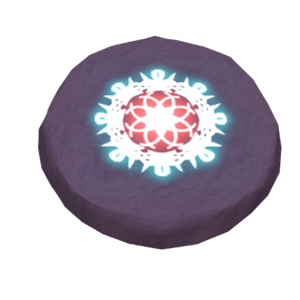

Enchanting is a player based skill which gives you the ability to enchant a variety of items. The owner of the current enchanting tablet is the Enchanting Leader. Your enchanting Level determines what items can be made.
Getting Started
- To get started you need to craft an Enchanting Tablet.
- If you are not Gold Membership activated, you will be limited to 1 enchant per hour. There is a 60 minute cooldown for non gold members.
How to Enchant
- Rez the Enchanting Tablet from your HUD:
- Open inventory app
- Click the enchanting tablet
- A pop up will appear
- Click "Rez Item"
- An Enchanting tablet will appear inworld
- Close the Inventory App (Click the red icon in the top left of the app window)
- (you will continue Enchanting by touching the tablet inworld)
- Open the Enchanting App and select ingredients:
- Touch the Enchanting tablet inworld
- That will open up a dialogue window
- Click "Open App"
- An app window will appear
- If it says "Preparing your App", then wait a few seconds and then click the app window again
- Drag the items you want to enchant on to the tablet icon within the app
- Click "Enchant"
- Items will sync with tablet inworld.
- Close the Enchanting App: Click the red icon in the corner. You will continue by clicking the tablet inworld
- Touch the Enchanting tablet inworld
- Cast your spells on the Enchanting Tablet:
- Touch the the Enchanting tablet to open dialog window
- Click "Cast Spell"
- Select the spell you wish to cast
- If multiple spells need to be cast of different elements, then have your friends cast the extra spells on your tablet.
- You will see in hover-text over enchanting tablet what spells have been cast already
- If you cast the wrong spells, you can simply "clear spells" from dialog window
- Click the tablet again and for the dialog window
- Click "Finalize" when the correct spells have been cast
- Your items will enchant and auto add your inventory
- You will receive a confirmation in local chat
[04:24] Enchanting Tablet #73: Finalizing...[04:24] Enchanting Tablet #73: ENCHANTING RESULT: Defense Rune
- You have finished enchanting, now you can either:
- Repeat the enchanting process by clicking the Enchanting tablet again
- Delete the tablet when finished enchanting.
- You will still have your tablet in your inventory.
- Deleting does not remove the tablet from your inventory.
See Also
| ||