Difference between revisions of "Pet menu"
Jump to navigation
Jump to search
MyraMidnight (talk | contribs) m (→Elevation) |
MyraMidnight (talk | contribs) |
||
| Line 14: | Line 14: | ||
==Cast Spell (menu)== | ==Cast Spell (menu)== | ||
| − | + | "''Choose a Spell''" | |
| − | + | *This menu lets you cast the [[Healing]] [[spells]] | |
==Elevation== | ==Elevation== | ||
Revision as of 16:37, 12 August 2014

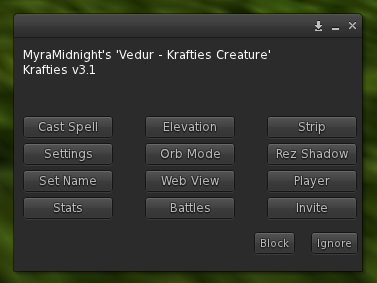
When you touch your Krafties pet, this menu opens up
The Pet Menu is the popup window that appears when you touch your Krafties pet. That menu contains alot of options and information.
| Cast Spell | Elevation | Strip |
|---|---|---|
| Settings | Orb Mode | Rez Shadow |
| Set Name | Web View | Player |
| Stats | Battles | Invite |
"Choose a Spell"
Elevation
"Creature movement has been paused temporarily. Please right click, select edit, and manually set the z position of the creature so it's feet appear to be touching the ground. After 30 seconds the new position will be saved."
- You will need to press this button before you begin adjusting your pet's height or location
Strip
- Spell Alerts On/Off
- Show/Hide Text
- Wander On/Off
- Animations On/Off
- Sounds
Rez Shadow
Set Name
Web View
Player
- Check Membership
- Statistics
Stats
Battles
- Assist On/Off
- Battle Style
- Set Spell
Invite
Choose a battle style for your creature. All Round - Trains all combat levels Accurate - Trains attack Aggressive - Trains strength Defensive - Trains Defense